Part 1 ended with the motherboard in a bag at a repair shop and me waiting for a phone call. This is what the call said, what I did about it, and — two months later than planned — the first time this machine came up on a screen.
The verdict: ruptured crystal oscillators
The shop’s diagnosis was moisture damage. Specifically, the crystal oscillators on the board had ruptured.
A crystal oscillator is the board’s metronome — a tiny slice of quartz in a sealed metal can that vibrates at a fixed frequency and gives the chipset something to count against. Everything downstream of it is timed by it. If the seal goes and moisture gets in, the quartz corrodes and the can can split, and then the board has no clock. Not a slow clock, not a wrong clock — none. Which lines up unnervingly well with what I’d been seeing: a board that doesn’t refuse to boot so much as never begin.
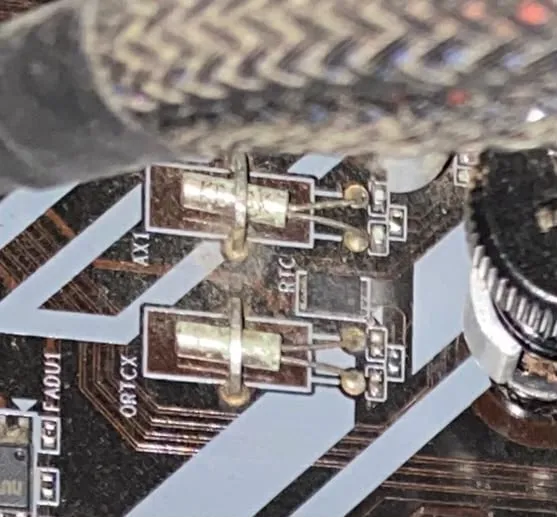
The culprits, up close. Two metal-can crystals, both discoloured, with corrosion creeping around the solder joints — and note the RTC silkscreen next to the lower one, marking the real-time clock circuit.
It also explains the two years in a corner. The box wasn’t in a damp room by any normal standard, but “not damp by normal standards” and “fine for a sealed component over twenty-four unpowered months” turn out to be different bars.
They said they’d order a replacement. Two days later they called back: they couldn’t get the parts. The only option was a new board.
So I collected it, put the bag on a shelf, and — as happens — shifted my attention to other things for a while.
Two months later
I’m not going to dress that up as a strategy. The gap between “I need a new motherboard” and “I ordered a new motherboard” was about eight weeks of it simply not being the thing I picked up on any given weekend.
The board arrived today. Same platform as the old one, same socket, same everything — except this variant has onboard WiFi, which I didn’t go looking for and won’t need on a machine that’s going to live on ethernet. Fine. It was the version that was available.
Assembly, and the barebones test again
Same cardboard-box approach as part 1, just with parts that hadn’t been condemned yet:
- CPU into the socket, then the cooler, with fresh thermal paste I’d ordered alongside the board. Old paste is the kind of thing that’s trivially cheap to redo and annoying to redo later.
- The PSU monster back into the loop — the same non-modular 650 W unit with the octopus of cables from part 1, still passing the paperclip test, still deeply unloved by whoever built this machine.
- One RAM stick and the GPU, all power connectors seated: 24-pin, EPS to the CPU, PCIe power to the card.
Then I shorted the PWR_SW pins.
The fans spun. GPU fan, CPU cooler fan, both alive. After two rounds of absolute silence, that is a genuinely good noise.
Then: no video
The card was spinning and the monitor stayed dark.
So I did the obvious loop, several times: reseated every power cable, pulled and refitted the GPU two or three times, cleared the CMOS. Nothing changed. Each pass ruled out a little and told me nothing.
The thing that actually broke the deadlock was the cheapest part in the build. I dug out the little PC speaker from the old board and plugged it into the front-panel header.
At first, still nothing — no beep. Which was a bad few minutes, because a board that spins fans but won’t beep is a board that isn’t finishing POST.
And then, on one of the attempts, it beeped. A single clean POST beep. And a moment later the monitor woke up and the screen came in.
What was actually wrong: probably nothing
This is the anticlimactic part. I can’t point at a component I fixed. The most likely story is that the monitor wasn’t catching the signal at the right moment during the handshake — coming out of standby too slowly, or sampling the input before the card had driven it — and the display simply never latched on. Once the timing happened to line up, it came up and stayed up.
I want to be honest that this is a theory, not a diagnosis. I changed several things across those attempts and then it worked, which is exactly the situation where you don’t get to claim you understand the cause. If it recurs on a cold boot, I’ll know more.
The lesson: I should have had the speaker in from part 0
Here’s what stings. Go back and read part 0. My entire diagnosis rested on the phrase “no LEDs, no fan twitch, no sound.”
But there was no speaker installed. So “no sound” wasn’t evidence of anything. I was listing it as a symptom when it was really just an absence of instrumentation — I had no channel for the board to tell me anything on, and I counted the silence on that dead channel as data.
A POST speaker costs about two euros and is the only component in the machine whose entire job is to tell you why the machine won’t work. On a box that boots fine, it’s useless. On a box that doesn’t, it’s the difference between “no response whatsoever” and an actual error code. It goes in first from now on, before the debugging starts, not sixty days into it.
Next: a case that can breathe
The board is alive on cardboard, which means the next thing standing between me and actually installing Proxmox is somewhere to put it.
I’m not reusing the old case. Part 1 was largely a story about that case — the dust, the two forgotten HDDs in a chasm I didn’t know existed, and a non-modular PSU crushed flat into a shroud with nowhere for its cables to go. Whether or not humidity was the whole story on the dead board, a machine I intend to leave running around the clock deserves better airflow than that one offered.
So: a new case, with real clearance behind the motherboard tray for the cable octopus, decent intake, and — I’m allowed one non-technical requirement — something I don’t mind looking at.
After that, finally, Proxmox.
If you’ve got a case you like for an always-on box that isn’t a screaming rackmount, I’d like to hear about it. And if you’ve dealt with ruptured oscillators on a board that was merely stored rather than flooded, I’m curious whether that’s as common as the shop made it sound.